ip
Lars User Guide 💛💜
Lars is a friendly, interactive chatbot designed to help users manage tasks, deadlines, and events efficiently.
This guide will show you how to interact with Lars and make the most of its features.
Quick Show
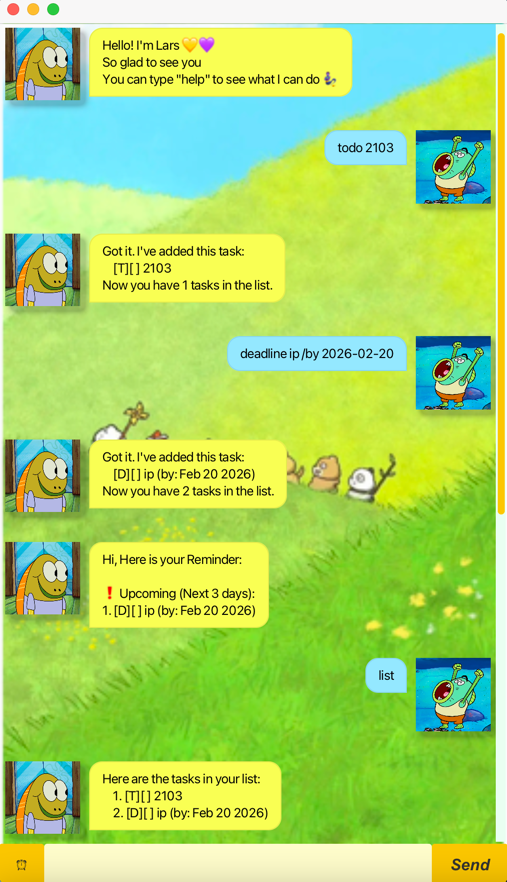
Getting Started
Prerequisites:
- For windows: JDK 17
- For Mac: Java 17 JDK+FX Azul distribution
- Download the jar file from the Releases page.
- Open a terminal in the jar file location.
- Launch the application
- double-click the
.jarfile - run via terminal with
java -jar lars.jar- You will see a welcome message from Lars.
- Tip: Type
helpanytime to see a list of supported commands.
Features
Quick Review
| Feature | Format |
|---|---|
| Help | help |
| List | list |
| Todo | todo <description> |
| Event | event <description> /from <start> /to <end> |
| Deadline | deadline <description> /by <yyyy-mm-dd> |
| Mark | mark <index> |
| Unmark | unmark <index> |
| Find | find <description> |
| Delete | delete <index> |
| Remind | remind or click the ⏰ button |
| Bye | bye |
More Details
1. Help - View all commands
Displays the full list of available commands and their formats.
Format
help
2. List - List all tasks
Displays every task currently in your list.
Format
list
3. Todo - Add tasks
Adds a task without any date/time constraints.
Format
todo <description>
Example
todo 2103
4. Event - Add events
Adds a task with a start and end time.
Format
event <description> /from <start> /to <end>
Examples
event project meeting /from 2026-02-10 /to 2026-02-10
5. Deadline - Add tasks with deadline
Adds a task that needs to be done by a specific date.
Format
deadline <description> /by <yyyy-mm-dd>
Example
- deadline return library book /by 2026-02-15
- deadline return library book /by 2026-02-15 1800
- deadline return book /by Sunday
6. Mark / Unmark - Update task status
Marks a specific task as completed or incomplete.
Format
- Mark as done:
mark <index>- Mark as not done:
unmark <index>
Examples
mark 1unmark 1
7. Find - find tasks
Find tasks according to keyword
Format
find <description>
Example
find book
8. Delete - remove tasks
Permanently deletes a task from the list.
Format
delete <index>
Example
delete 2
9. Remind - Check urgent tasks
Shows tasks that are overdue or approaching their deadline.
Format
- Type command:
remind- Click the
⏰button
10. Bye - Exit the program
Closes the application.
Format
bye
Project Status
Feature-complete
Actively maintained